

Actions are a set of functions that your package needs to work or expose for other packages. They can modify the state and don't return anything.
Actions don't return data. Data is always accessed via the state. That's because Frontity is following the Flux pattern (like Redux).
Let's see one simple example:
actions: {
    theme: {
        openMenu: ({ state }) => {
            state.theme.isMenuOpen = true;
        },
        closeMenu: ({ state }) => {
            state.theme.isMenuOpen = false;
        }
    }
}
Actions are similar to derived state. They receive ({ state }) in their argument but that gets stripped out when you consume them:
actions.theme.openMenu();And similar to derived state functions, they can also receive arguments if they are declared using a second function:
actions: {
    theme: {
        setMenu: ({ state }) => value => {
            if (value === "open")
                state.theme.isMenuOpen = true;
            else if (value === "closed")
                state.theme.isMenuOpen = false;
        },
    }
}
And they are consumed like this:
actions.theme.setMenu("open");Actions can be used either by their own package or by other packages.
For example, tiny-router (and all packages that want to implement the router API) exposes the action actions.router.set(). This action modifies state.router.link and makes sure that the URL of your browser is in sync. Additionally, tiny-router also runs this action if users click on the back and forward buttons of their browsers.
By the way, you can access the actions in the client console using:
> frontity.actionsFrontity Lifecycle Initialization Actions#
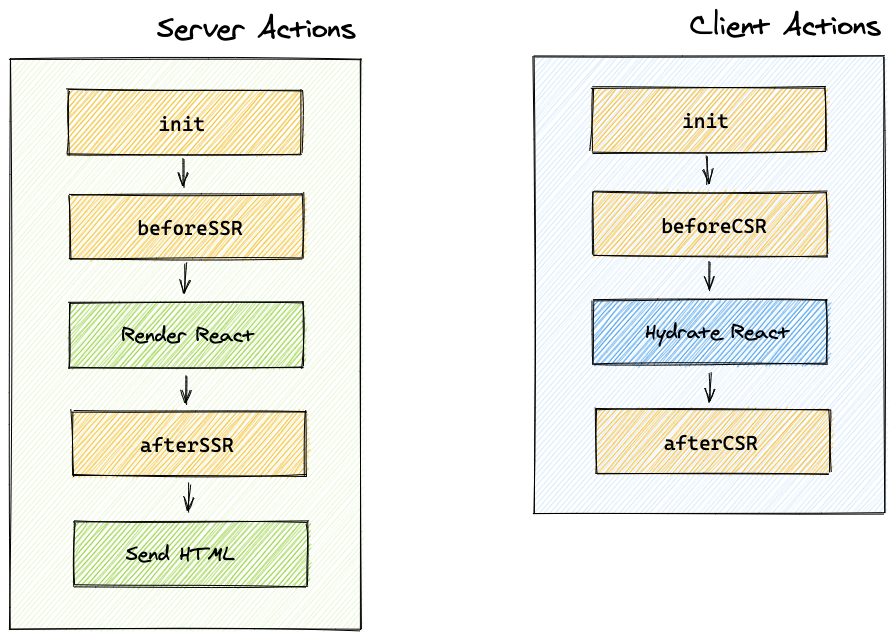
There are a set of special actions that Frontity runs at appropriate moments when initializing the app in either the Client and the server-side :
init (client & server)#
Packages can use this action to initialize their internal libraries. Packages should not use actions or libraries from other packages as they may not be properly initialized.
beforeSSR (server only)#
The purpose of this action is to prepare the state for the React render made in the server. Packages can populate it with content fetched from external APIs, like the WP REST API. They can also interact with other packages if necessary.
You can optionally use the curried version of beforeSSR which is called with an object that contains the Koa Context in the ctx parameter. You can use this ctx to modify things like status codes, headers and so on.
// Without the context
{
  beforeSSR: ({ state, libraries }) => {
    console.log('Gonna SSR this page');
  }
}

// The optional curried version using the context
{
  beforeSSR: ({ state, libraries }) => async ({ ctx }) => {
    // ctx is koa context: https://koajs.com/#context
    console.log('SSR all day long', ctx.status);
  }
}
afterSSR (server only)#
This action runs after the HTML has been generated by React, but before the state snapshot is taken and the HTML is sent to the client. Therefore, packages can use the afterSSR step for things like setting headers or removing parts of the state that shouldn't be exposed to the client.
beforeCSR (client only)#
This action is run before React is hydrated. Be aware that the state that React needs for the hydration is already received from the server so you don't need to replicate the fetching done in beforeSSR.
afterCSR (client only)#
This action is run after React has been hydrated in the client and it has taken control of the page. This is where packages with client-side logic can start doing their thing.
If you still have any questions about Actions in Frontity, please check out the community forum, which is packed full of answers and solutions to all sorts of Frontity questions. If you don't find what you're looking for, feel free to start a new post.